How to Choose the Best Robotics Software for Beginners?
Choosing the right robotics software is crucial for beginners. With so many options available, it can be daunting. Beginners often feel overwhelmed by technical jargon. However, selecting the right tools can make a significant difference in learning.
When exploring robotics software, look for user-friendly interfaces. A well-designed platform can simplify complex concepts. Consider features like tutorials and community support. These elements can enhance your learning experience. Remember to check for compatibility with hardware.
It’s essential to reflect on your goals. Not all software suits every project. You might find a tool that excites you, yet lacks necessary features. Always weigh pros and cons before deciding. The right robotics software can inspire creativity and innovation in your projects.
What to Consider When Choosing Robotics Software for Beginners
When choosing robotics software for beginners, several factors are critical. Ease of use should be at the forefront. Software with a user-friendly interface allows new users to navigate quickly. According to a survey by the Robotics Industry Association, over 70% of beginners struggle with complex setups. Intuitive design can drastically reduce this barrier.
Compatibility with different hardware is also essential. Not all software works with every robotic kit on the market. A mismatch can lead to wasted time and frustration. Research indicates that beginners often abandon projects due to software limitations. This can result in lost interest in robotics altogether, which is regrettable for an industry poised to grow.
Support and resources matter too. Beginners may need help setting up or troubleshooting. Software with active forums, tutorials, and customer support is beneficial. According to a report from MIT's Media Lab, 60% of beginners learn best through community engagement. Ultimately, the right software should foster both learning and experimentation without overwhelming users.
Evaluating Key Features: Usability, Programming Languages, and Tools
Choosing the right robotics software involves careful evaluation of key features. Usability is paramount for beginners. A user-friendly interface encourages experimentation. Complex layouts can lead to frustration. According to a recent industry report, 70% of beginners abandon software due to its difficulty. An intuitive design can greatly enhance the learning experience.
Programming languages are another crucial factor. Different software supports various languages, like Python or C++. Beginners benefit from starting with a language that has ample resources and tutorials. A study found that 65% of new learners prefer Python for its simplicity. However, not all software provides extensive documentation. This can hinder progress. Users must weigh the benefits of learning a language against the available support.
Tools integrated into the software also matter. Features like simulation environments and real-time feedback enhance understanding. Yet, some platforms lack these tools. Analyzing their offerings can prevent wasted time. A resource report indicated that 40% of beginners felt unprepared without proper simulation tools. Proper evaluation can make the learning process smoother and more enjoyable.
Comparison of Popular Robotics Software: ROS, V-REP, and Others
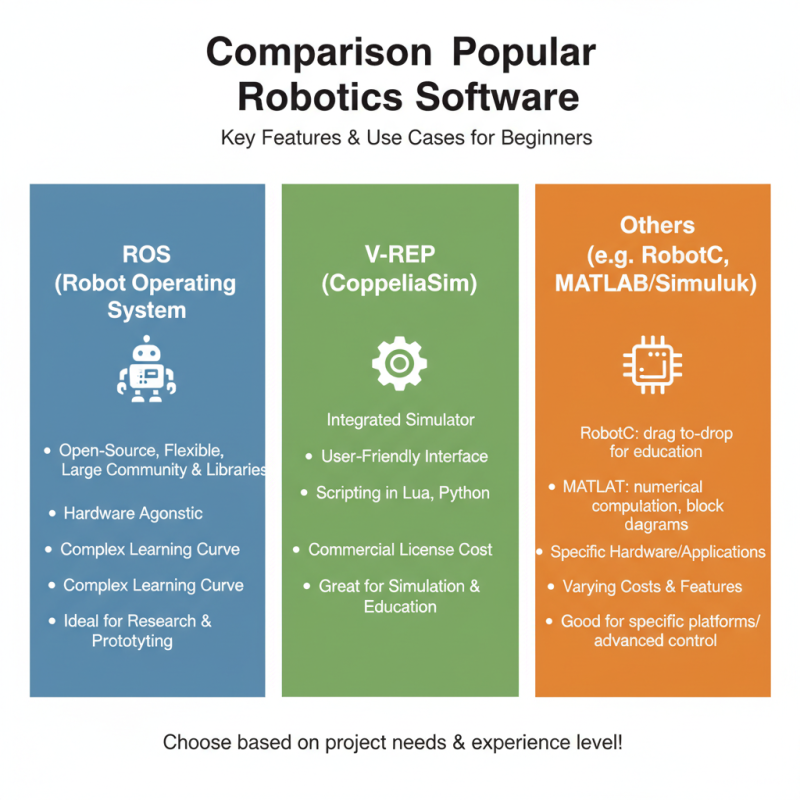
Choosing the right robotics software can be daunting for beginners. Different tools have unique features and learning curves. This post compares some popular options, focusing on their strengths and weaknesses.
One common choice is a framework that supports various tasks, from simulation to real-world application. It offers flexibility, but it may overwhelm beginners. Learning to navigate its complex interface takes time. Another software tool provides a highly user-friendly environment. Its drag-and-drop features make creating simulations easier. However, this simplicity sometimes limits advanced functionalities, making it less suitable for ambitious projects.
Other tools also balance user experience and capability. Some have good tutorials but lack extensive community support. In contrast, others thrive in collaborative environments but can feel intimidating at first. Beginners must reflect on their goals. Consider what features matter most. Ultimately, the best choice aligns with personal learning style and project needs.
Understanding the Learning Curve: Support and Community Resources
Understanding the learning curve is essential for new robotics enthusiasts. When choosing robotics software, beginners often feel overwhelmed. The abundance of resources can be intimidating, yet support systems are crucial. Many online forums promote active discussions. These communities are invaluable for troubleshooting. A simple question can lead to helpful answers or resources.
Moreover, engaging with other learners fosters a collaborative spirit. It simplifies the learning process, making it less frustrating. However, not all advice is perfect. Some community suggestions may confuse rather than help. Filtering useful information from distractions can take time. It requires patience and critical thinking. Reflecting on what works best for you is necessary.
Hands-on projects enhance the learning experience significantly. Experimenting with different tasks helps to reinforce concepts. Mistakes will happen. Learning from these failures is vital for growth. Seeking guidance through tutorials can provide clarity. Ultimately, the journey in robotics is personal, requiring persistence and resourcefulness. Each interaction shapes your understanding along the way.
How to Choose the Best Robotics Software for Beginners? - Understanding the Learning Curve: Support and Community Resources
| Software Feature |
Importance Level (1-5) |
Available Resources |
Community Support (Yes/No) |
| User-Friendly Interface |
5 |
Tutorial Videos, Documentation |
Yes |
| Simulation Capabilities |
4 |
Online Examples, Forums |
Yes |
| Flexibility & Customization |
3 |
API Documentation, Sample Code |
No |
| Integration with Hardware |
4 |
Integration Guides, FAQs |
Yes |
| Cost & Licensing |
3 |
Price Comparison Tools, Discounts |
No |
Budgeting for Robotics Software: Cost Comparison and Value for Beginners
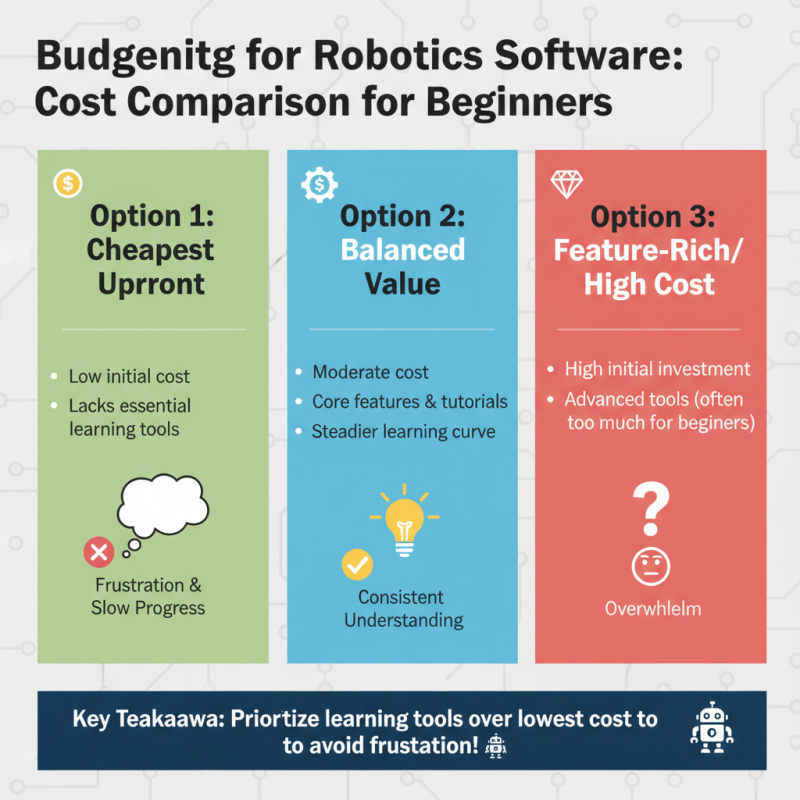
When selecting robotics software, budgeting is key. Beginners often face a dilemma between cost and features. It's tempting to choose the cheapest option, but this might lead to frustration. Certain software may seem affordable upfront but lack essential learning tools. This can hinder progress and understanding.
A good strategy is to compare different software costs. Some tools offer free trials, which can be valuable. Utilize these trials to test features and usability. Pay attention to community support and online resources. A software with a strong community can provide help and tips. Sometimes, spending a bit more on better support can save time in the long run.
However, be wary of overspending. It’s easy to be swayed by flashy features that won’t be used. Focus on your goals. Ask yourself what you genuinely need. If possible, seek out peer recommendations. Real experiences often highlight software strengths and weaknesses. Budgeting wisely in this area can make the difference between a steep learning curve and a rewarding experience.